The Giveaway Analysis page helps users understand where and how product giveaway is occurring across production lines and recipes. It provides both high-level metrics and detailed batch-level insights to support continuous improvement and cost control.
This guide explains how to use the page effectively, including filters, data visualisations, and tables.
Filter Panel (Top of Page)
At the top of the page, you'll find a set of filters to refine your view. These filters apply to all data and visualizations on the page.

Available Filters:
Date Range – Select a start and end date to view data within a specific period.
Line – Choose one or more production lines to isolate data from specific equipment.
Recipe – Filter the analysis to batches made using selected recipes.
Search by Recipe – Quickly locate a specific recipe by typing part or all of its name.
KPI – Select a key performance metric, such as Giveaway %, to focus the analysis.
Each filter includes an Exclude option to omit selected values from the data view.
Key Summary Metrics
Directly beneath the filter panel, the following high-level giveaway metrics are displayed:
Total Giveaway – The cumulative amount of product over the target weight, across all selected data.
Total Tonnage – The total weight of all produced products within the filtered dataset.
GA Percentage (Giveaway %) – The percentage of giveaway compared to total production, indicating efficiency.
Total Packs – Total number of individual packs produced in the selected range.

These values help quantify the impact of giveaway in both volume and efficiency terms.
Giveaway Analysis Table
This table provides detailed breakdowns of giveaway data by batch. Columns typically include:
Recipe Name
Date
Line
Total Packs
Runtime
Giveaway
Giveaway %
Weight Produced
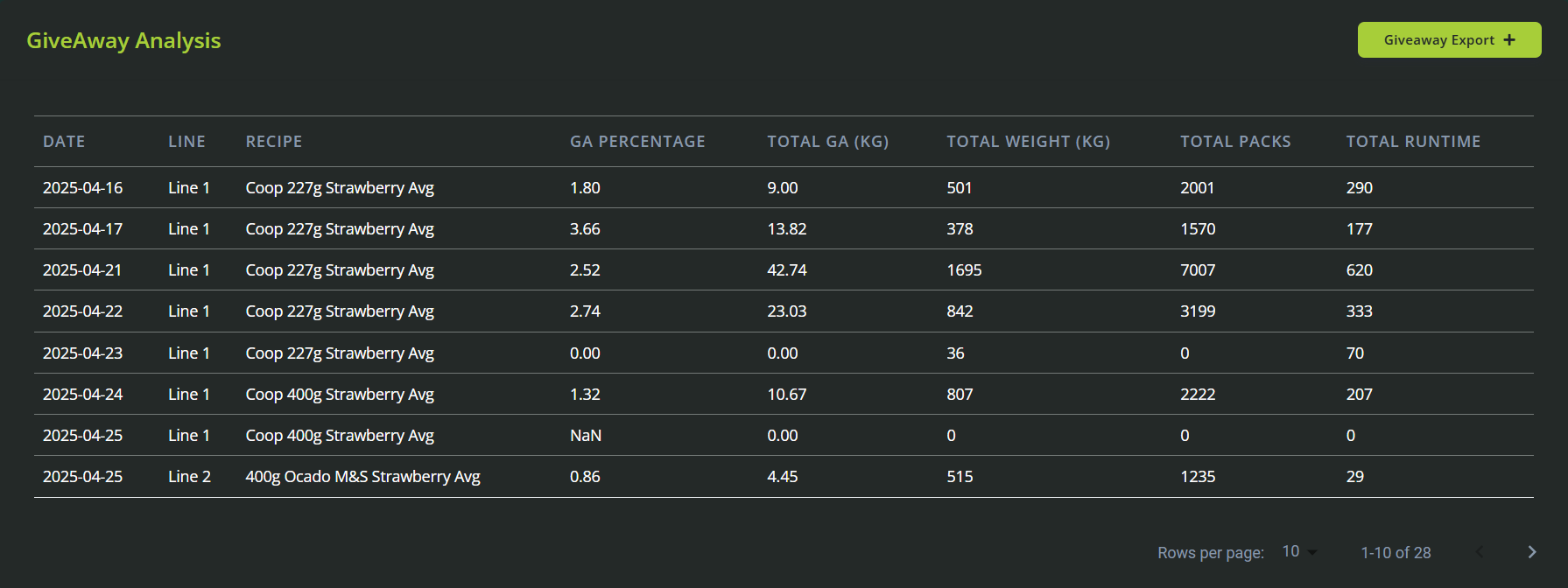
The table can be sorted and filtered, and is used to pinpoint specific days, recipes, or lines with high giveaway.
Visual Graphs & Analysis
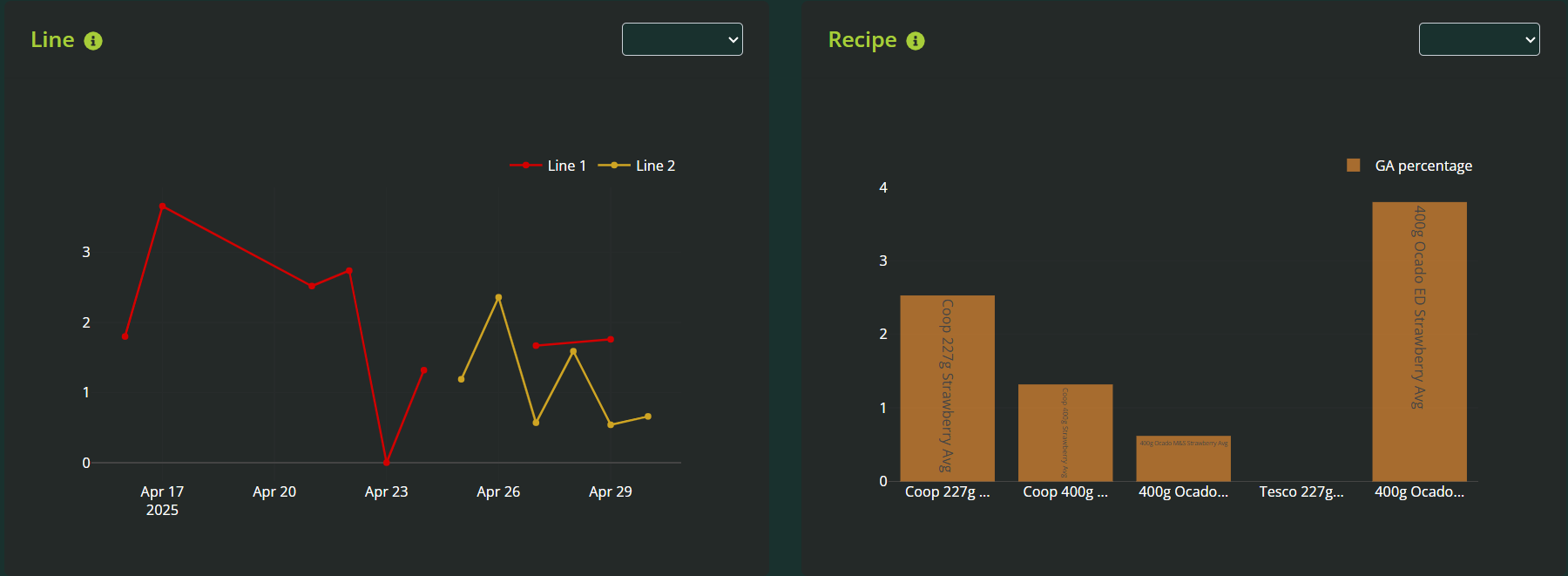
Line Graph: Daily GA % by Line
Shows the Giveaway Percentage over time (daily) for each selected production line.
Useful for spotting trends, spikes, or consistent underperformance on certain lines.
Bar Graph: Daily GA % by Recipe
Displays giveaway percentage per day for selected recipes.
Helps compare recipe-level efficiency over time.
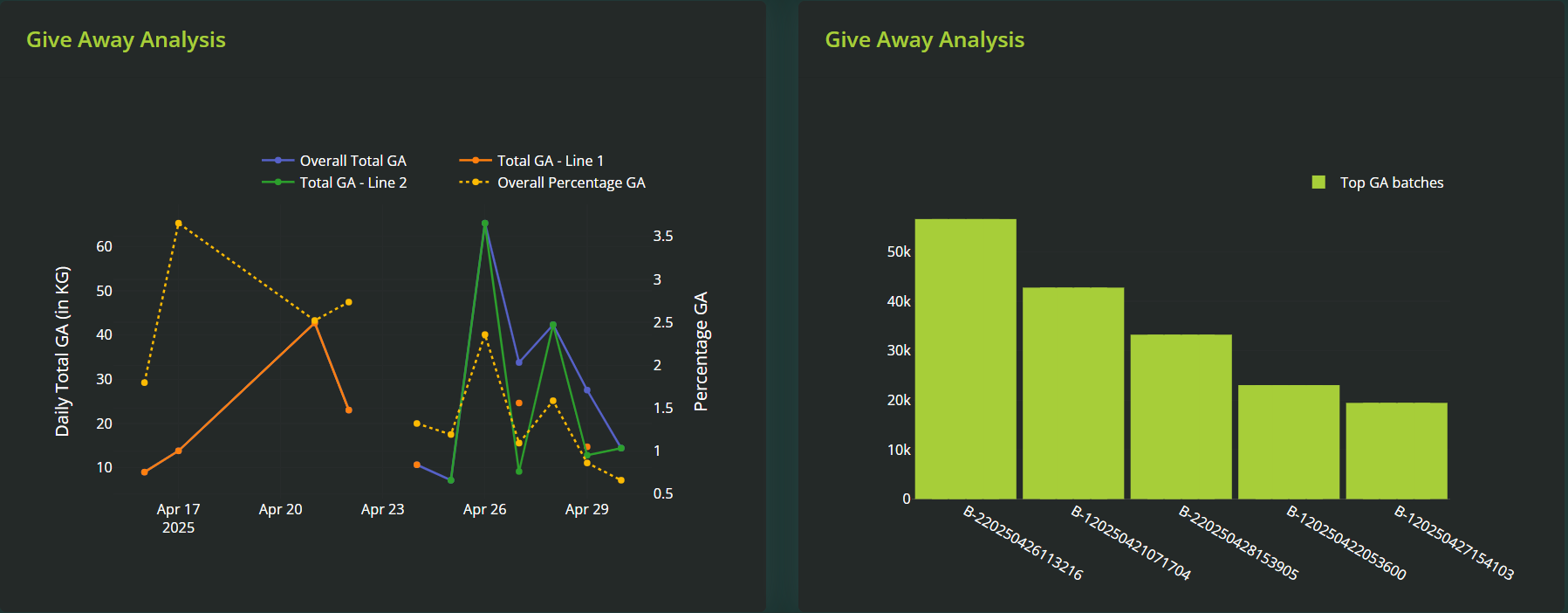
Line Graph: Giveaway Analysis Trend
A continuous line showing how giveaway has trended over the selected date range.
Supports long-term tracking of improvements or degradations in giveaway control.
Bar Graph: Total Giveaway by Batch
Visualizes total giveaway (weight or cost) per batch.
Highlights the highest loss points at a batch level, making it easy to identify where intervention is needed.
✅ How to Use This Page
Start by applying filters for the date range, line, and/or recipe you want to analyse.
Review the key summary metrics to get a high-level understanding of total giveaway impact.
Use the analysis table to sort by Giveaway % or Total Giveaway and find the worst-performing batches.
Compare lines and recipes visually using the graphs to detect recurring patterns or specific problem areas.
Export data if needed for further investigation or reporting (if export functionality is available on your platform).
Example Use Cases
Investigate a spike in product loss last week on Line 3.
Compare Giveaway % across recipes to determine which formulation consistently runs heavy.
Track improvement after a process change by comparing GA trends before and after.
Prepare a cost impact report using Total Giveaway and Total Tonnage for a specific date range.
Find the most efficient line over the past month by comparing GA % trends between all lines.
Was this article helpful?
That’s Great!
Thank you for your feedback
Sorry! We couldn't be helpful
Thank you for your feedback
Feedback sent
We appreciate your effort and will try to fix the article